Posts mit dem Label Central Administration werden angezeigt. Alle Posts anzeigen
Posts mit dem Label Central Administration werden angezeigt. Alle Posts anzeigen
Dienstag, 24. April 2012
Central Administration prompts for password
Before you start digging for complex reasons try this one: Add the Central Administration site to the Local Intranet Sites on the Application Server, this should solves the problem in most of the cases.


Dienstag, 27. März 2012
How to add a field to the User Profile / Active Directory synchronization
In the AD I
Have this:
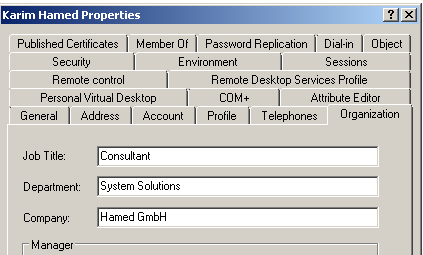
But when I
look in the User Profile the field “Company” Is missing. To see if the field is
even synced let’s look at the User Profile service:
- Connect to the Central Administration
- Go to Application Management – Service Applications – Manage service applications
- Click on the User Profile Service Application

- Click on “Manage User Profiles”

- Search for a User and look if you can find the field Company

In My case
the field “Company” is missing. So let’s add this field
- Go back to the manage Profile Service Screen and click on Manage User Properties

- Click “New Property” and fill out the following Form:

Basically
that’s it. If you want to see the changes in the User Profiles you need to
Start Synchronization. Go back to the Manage Profile Service Screen and click
on “Start Profile Synchronization”

Run a Full
Synchronization and wait until it finished. Be aware that a full sync is time
and compute intensive.
Now your field
should show up in the SharePoint User Profile
Abonnieren
Posts (Atom)